Jupyter Lab Failed to Start
Documentation for Jupyter Failed
TL;DR
It is likely because you have previously configured Jupyter. Simply delete the .jupyter folder in your user directory.
1. Failed to Start Due to Hardcoded Jupyter Pem File
Reported on December 25, 2024, the user's startup log is as follows:
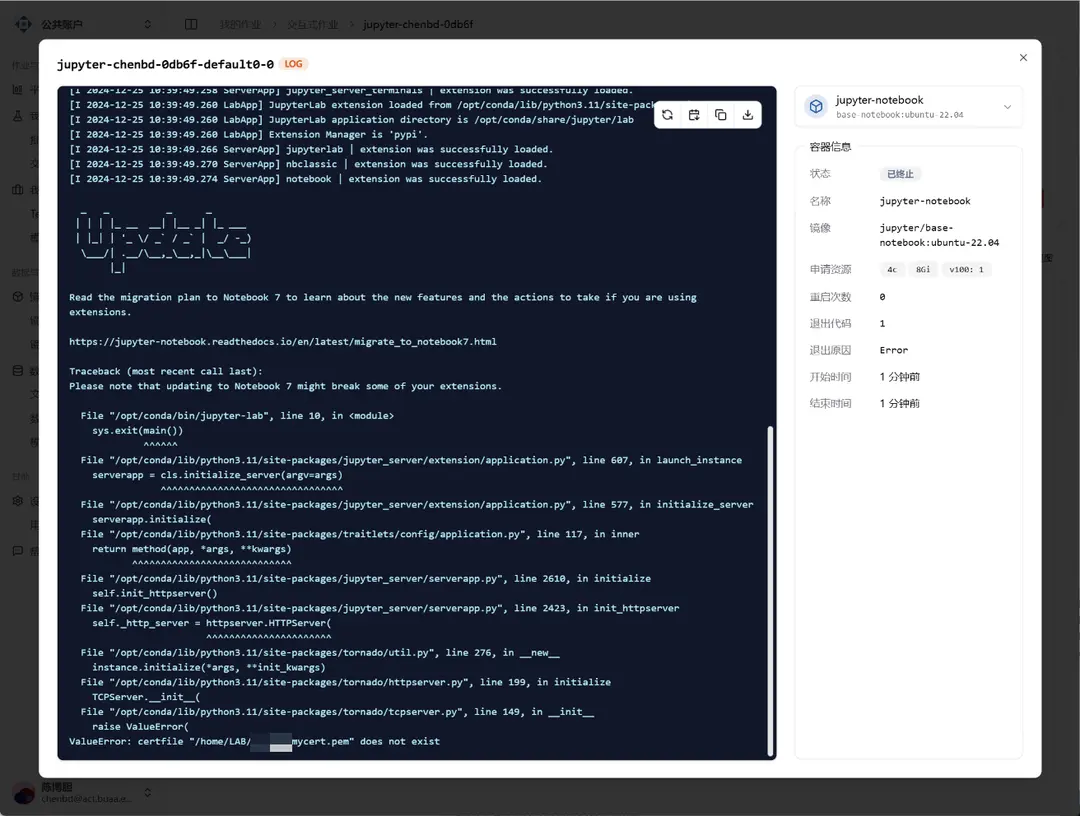
The interactive job failed to start because the file /home/LAB/{username}/mycert.pem could not be found. This is because we synchronized the user's files from the old Slurm cluster. In the previous Slurm cluster, the user's home directory was /home/LAB/{username}, but it is now the more standard /home/{username}.
Additionally, the user had previously configured Jupyter's TLS connection on the Slurm cluster, so the Jupyter configuration file in the /home/{username}/.jupyter folder contains a hardcoded path to the pem certificate.
There are two solutions to this issue:
- Delete the
/home/{username}/.jupyterfolder - Modify line 161 of the
jupyter_notebook_config.pyfile to change the path to$HOME/mycert.pem
Connect VSCode to Jupyter Container
This feature allows users to connect directly to the container environment via VSCode after creating a Jupyter job, enabling the use of VSCode's code completion, debugging capabilities, and rich plugin ecosystem to enhance development efficiency and user experience.
Guide to Migrating Environment from Slurm Cluster
Reusing existing Conda environments or rebuilding Python environments